


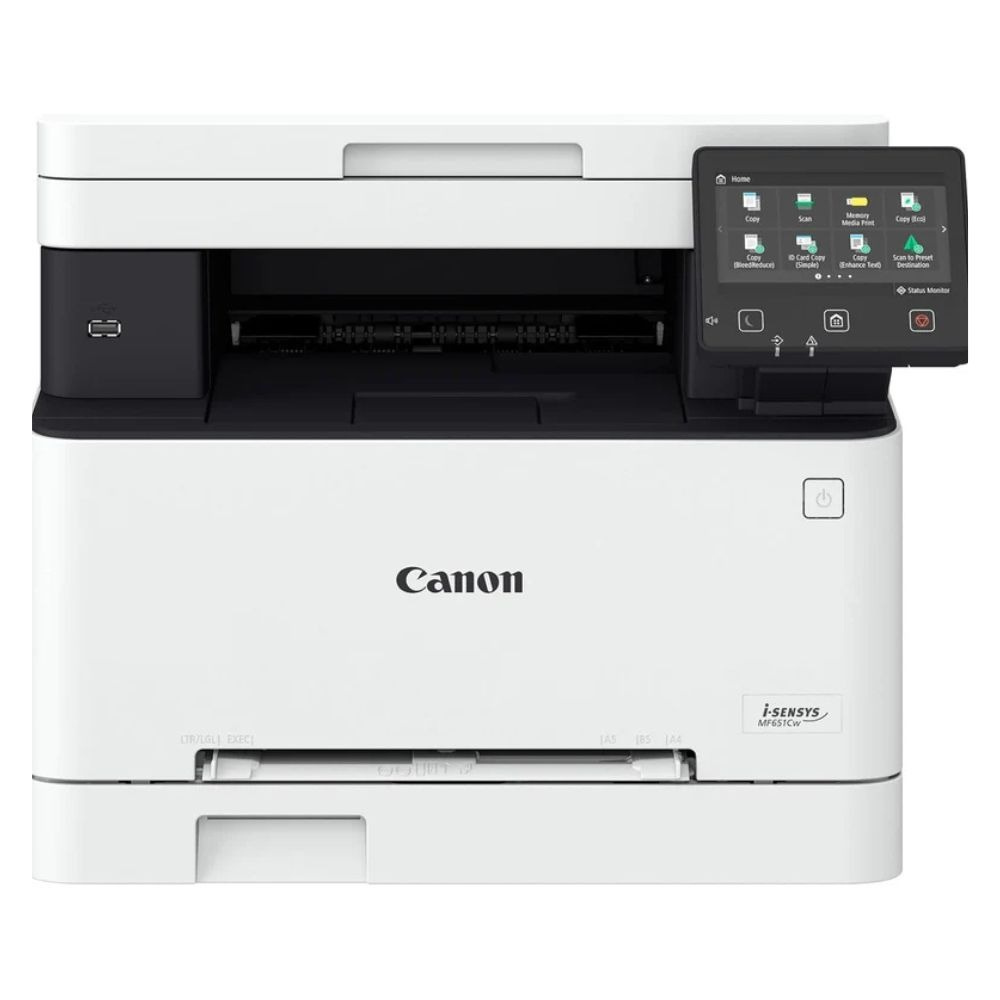


Efficiency and Design of the Canon i-SENSYS MF651Cw Colour Laser 3-in-1 Office Printer
The Canon i-SENSYS MF651Cw Colour Laser 3-in-1 Office Printer brings together efficiency, reliability, and quality in one compact device designed to meet the needs of modern offices. It delivers crisp and vibrant colour prints that enhance the visual appeal of documents and presentations. With its advanced laser printing technology, it ensures consistent results, even during high-volume printing tasks, while maintaining low energy consumption. The Canon i-SENSYS MF651Cw is a dependable companion for both small offices and busy work environments where professional-quality documents are essential.
Scanning and Copying Features of the Canon i-SENSYS MF651Cw Colour Laser 3-in-1 Office Printer
In addition to printing, the Canon i-SENSYS MF651Cw Colour Laser 3-in-1 Office Printer offers efficient scanning and copying capabilities, making it a true multitasking powerhouse. It enables users to digitize documents quickly and produce copies that retain the clarity and accuracy of the originals. The integrated flatbed scanner allows for easy handling of varied document types, including ID cards and booklets. Through its intuitive control panel and responsive touchscreen, users can manage all operations with ease, ensuring seamless workflow and improved productivity.
Connectivity and Smart Integration in the Canon i-SENSYS MF651Cw Colour Laser 3-in-1 Office Printer
When it comes to connectivity, the Canon i-SENSYS MF651Cw Colour Laser 3-in-1 Office Printer supports multiple options, including Wi-Fi, USB, and network connectivity, allowing for flexible placement and easy access. Mobile printing is made simple with compatibility for AirPrint, Mopria, and the Canon PRINT Business app, which lets users print directly from smartphones or tablets. These smart connection features make the printer ideal for hybrid workspaces where convenience and mobility are essential.
User Experience and Interface of the Canon i-SENSYS MF651Cw Colour Laser 3-in-1 Office Printer
The Canon i-SENSYS MF651Cw Colour Laser 3-in-1 Office Printer also excels in usability, offering a user-friendly interface that reduces setup time and enhances operation efficiency. Its large colour touchscreen provides clear navigation through menus and settings, while the customizable home screen ensures quick access to frequently used functions. This thoughtful design reflects Canon’s focus on user comfort and productivity, making daily printing and scanning tasks more manageable.
Performance and Output Quality of the Canon i-SENSYS MF651Cw Colour Laser 3-in-1 Office Printer
Performance is at the core of the Canon i-SENSYS MF651Cw Colour Laser 3-in-1 Office Printer, with fast print speeds and high-quality output. It supports a variety of paper sizes and media types, giving businesses the flexibility to create professional reports, brochures, and marketing materials in-house. The printer’s high-yield toner cartridges reduce the frequency of replacements, ensuring that operations remain uninterrupted for longer periods. Consistent colour reproduction across documents adds a touch of professionalism that stands out in every project.
Eco-Friendly Operations with the Canon i-SENSYS MF651Cw Colour Laser 3-in-1 Office Printer
The Canon i-SENSYS MF651Cw Colour Laser 3-in-1 Office Printer promotes eco-friendly operation through efficient power management and reduced waste output. Its automatic sleep mode helps conserve energy when not in use, while the low-melting-point toner contributes to lower carbon emissions. Canon’s dedication to sustainability is reflected in the printer’s durable build and recyclable components, making it a smart choice for environmentally conscious offices aiming to minimize their ecological footprint.
Innovation and Productivity in the Canon i-SENSYS MF651Cw Colour Laser 3-in-1 Office Printer
By integrating innovation and practicality, the Canon i-SENSYS MF651Cw Colour Laser 3-in-1 Office Printer ensures that every print, copy, and scan is handled with precision and reliability. Its combination of speed, clarity, and advanced features makes it an excellent addition to any workspace focused on quality and performance. Through its compact design and multifunctional capabilities, this printer continues to redefine office productivity while maintaining Canon’s legacy of excellence in imaging technology.



Reviews
There are no reviews yet.